


WebRTC API Update 2025
January 25, 2025
6 min
More and more people are looking into MoQ (Media over QUIC). But MoQ is not one technology, it is a stack of several ones, and that makes it complex to start with. So instead of jumping directly to the top of that stack, I decided to start from the bottom: WebTransport, the transport MoQ relies on. Taking inspiration from what others have written on the subject, I tried to build something concrete with it like a small walkie-talkie application to talk with an AI agent (Push-to-talk application) to check for myself whether such a scenario makes more sense with WebRTC, or with something new built on WebTransport.
If you follow the real-time media space, you can’t miss MoQ. CDN vendors are deploying it, browser teams are experimenting with it, and the IETF working group keeps iterating: the moq-transport draft reached draft-18 in May 2026, and an RFC should come soon.
Tsahi Levent-Levi wrote a good piece about the MoQ adoption problem: a lot of vendor push, not much application pull yet, and a developer community that mostly asks “should we start looking at this now, or is it still too early?“.
He is not the only one asking. On webrtcHacks, Philipp Hancke checked Chrome’s usage telemetry and concluded that, despite the announcements, no one seems to have successfully switched from WebRTC to MoQ yet. And Chad Hart, with Gustavo Garcia and other contributors, compared the two use case by use case: WebRTC keeps winning for 1:1 calls and meetings, MoQ is emerging for live streaming and webinars… and for Voice-AI, their verdict is an honest shrug: hopefully something better than raw media over WebSocket, but maybe neither WebRTC nor MoQ.
Keep that last point in mind: the example of this article is precisely a voice-AI pipeline, and it is built on the layer that sits underneath both candidates.
Part of the answer to that question is that MoQ is hard to evaluate because it is a set of layered technologies:
Note: one thing is not in that stack: the codecs. MoQ transports media that is already encoded; in a browser, producing and consuming those encoded frames is the job of WebCodecs. Keep that in mind, it explains why WebCodecs shows up everywhere in the rest of this article.
You cannot reason about MoQ if you have never touched its foundation. So this article focuses on the second layer, the one you can use today in your browser: WebTransport.
The simplest way to position WebTransport is to put it next to the three transports web developers already know:
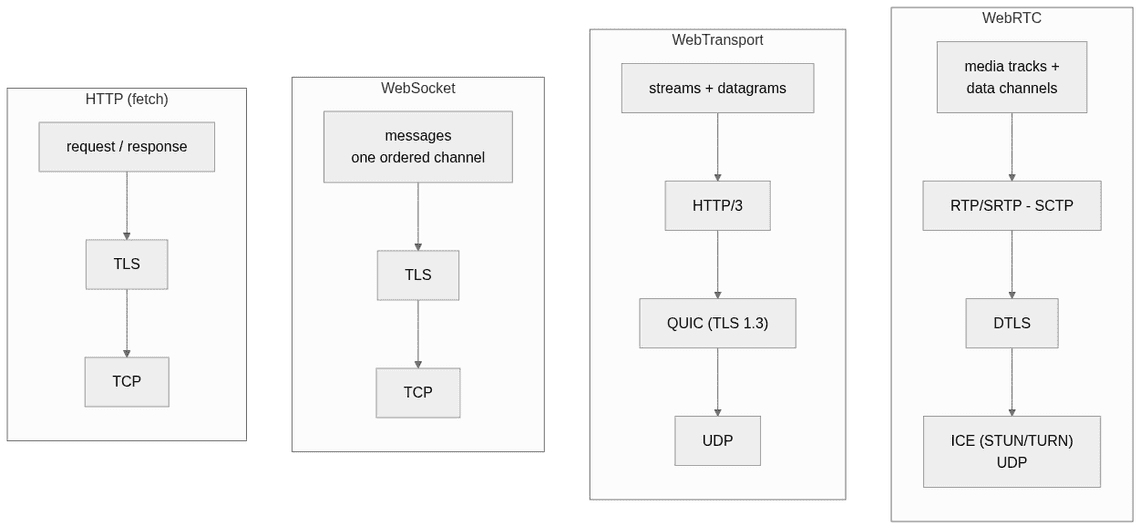
https:// URL, and once established you get raw transport primitives, nothing more.Those primitives are three:
A quick comparison:
| WebSocket | WebTransport | WebRTC | |
|---|---|---|---|
| Model | messages, one channel | streams + datagrams | media tracks + data channels |
| Underlying transport | TCP | QUIC over UDP | SRTP / SCTP over DTLS (UDP) |
| Topology | client-server | client-server | peer-to-peer* |
| Unreliable delivery | no | yes (datagrams) | yes (RTP, lossy data channels) |
| Head-of-line blocking | yes | no (between streams) | no for media |
| Connection setup | HTTP upgrade | one QUIC handshake (1-RTT, 0-RTT on resume) | signaling + ICE + DTLS (typically 3 to 8 RTTs) |
| Media stack | none | none, bring WebCodecs | complete |
* WebRTC is peer-to-peer by design, but nothing forces the second peer to be a browser: it can be a server that acts as a peer termination, like an SFU.
A few properties worth keeping in mind before we continue:
MediaStream. This is a vocabulary trap for WebRTC developers. A WebTransport stream is a pipe of bytes, whatever flows through it: it knows nothing about audio or video. Nothing to do with the WebRTC meaning, where a stream carries media tracks with their codecs, clocks and timestamps.That last point also tells you what a fair comparison looks like: WebRTC should not be put side by side with WebTransport alone, but with MoQ, the full stack: WebTransport for the transport, WebCodecs for the encoding, and MOQT on top. The one-line summary I keep coming back to: WebRTC is a complete telephony stack, WebTransport is a socket. Choosing between them is not about which one is faster. It is about how much of that stack you actually need, and who the second endpoint is.
To experiment, I built a push-to-talk application: you hold a button while asking your question, you release it, and an AI agent answers you, with its voice and the text transcript streamed back to the page.
One design choice matters here: I don’t want to keep the connection alive after the interaction, because I have no idea whether a next question will ever come. So each press of the button opens a fresh connection, and each answer closes it — which means establishing it has to be quick.
I spent most of my time sending audio through RTCPeerConnection, so my reflex was to reach for WebRTC. But look at what this application actually needs:
There is no peer. The “remote party” is a machine I operate. And that changes everything, because most of what WebRTC brings exists to solve problems I don’t have here:
Running a WebRTC stack server-side just to ingest audio means embedding libWebRTC, Pion or aiortc, terminating ICE and DTLS-SRTP, and unpacking RTP, only to receive bytes I could have read from a socket. This is exactly the pain the voice-AI ecosystem has been vocal about: when the peer is a GPU farm, the peer-to-peer machinery is pure overhead.
This is the concrete case where WebTransport could make sense.
The browser side uses WebTransport and WebCodecs; the server side is a plain Node.js process using @fails-components/webtransport for HTTP/3. The AI part is the Gemini Live API, which does the speech-to-text, the reasoning and the voice synthesis: I created an API key in Google AI Studio and put some credits on the project.
The architecture is deliberately minimal:
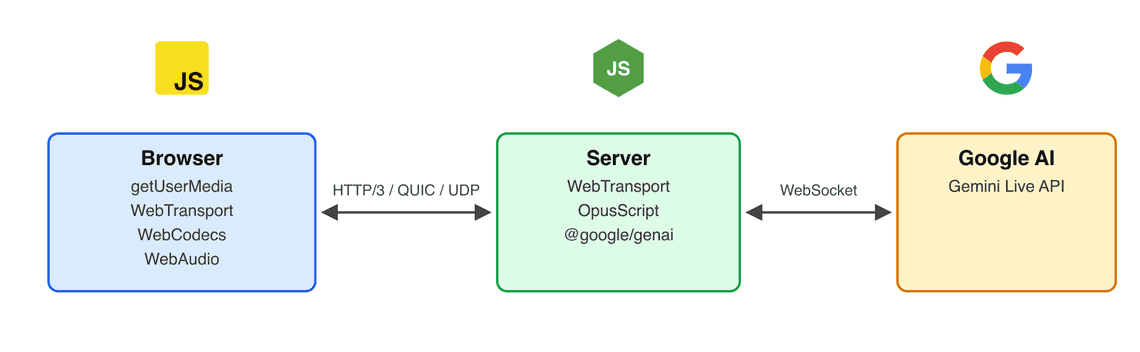
The browser opens one WebTransport session, and everything else is channels inside that sessiob. What I like in this design is that every WebTransport channel type is used exactly once, each for the job it is good at:
| Channel | Carries | Why this type |
|---|---|---|
| bidi stream | control events, both directions | reliable + ordered + bidirectional: every event is a state transition that cannot be dropped or reordered |
| uni stream (up) | mic audio (Opus) | direction-pure media, and closing it (QUIC FIN) is the end-of-speech signal: reliable, ordered after the last byte |
| uni stream (down) | bot voice (PCM 24 kHz) | bulky media kept out of the event stream: a slow audio read never delays an event |
| datagrams | RTT probes | [Optional] freshness beats completeness: a late echo is a useless echo |
And here are all the exchanges of one complete run, from the moment I press the button to the end of the bot’s answer. Each color is one channel of the session; dashed arrows are signaling, solid arrows are media:
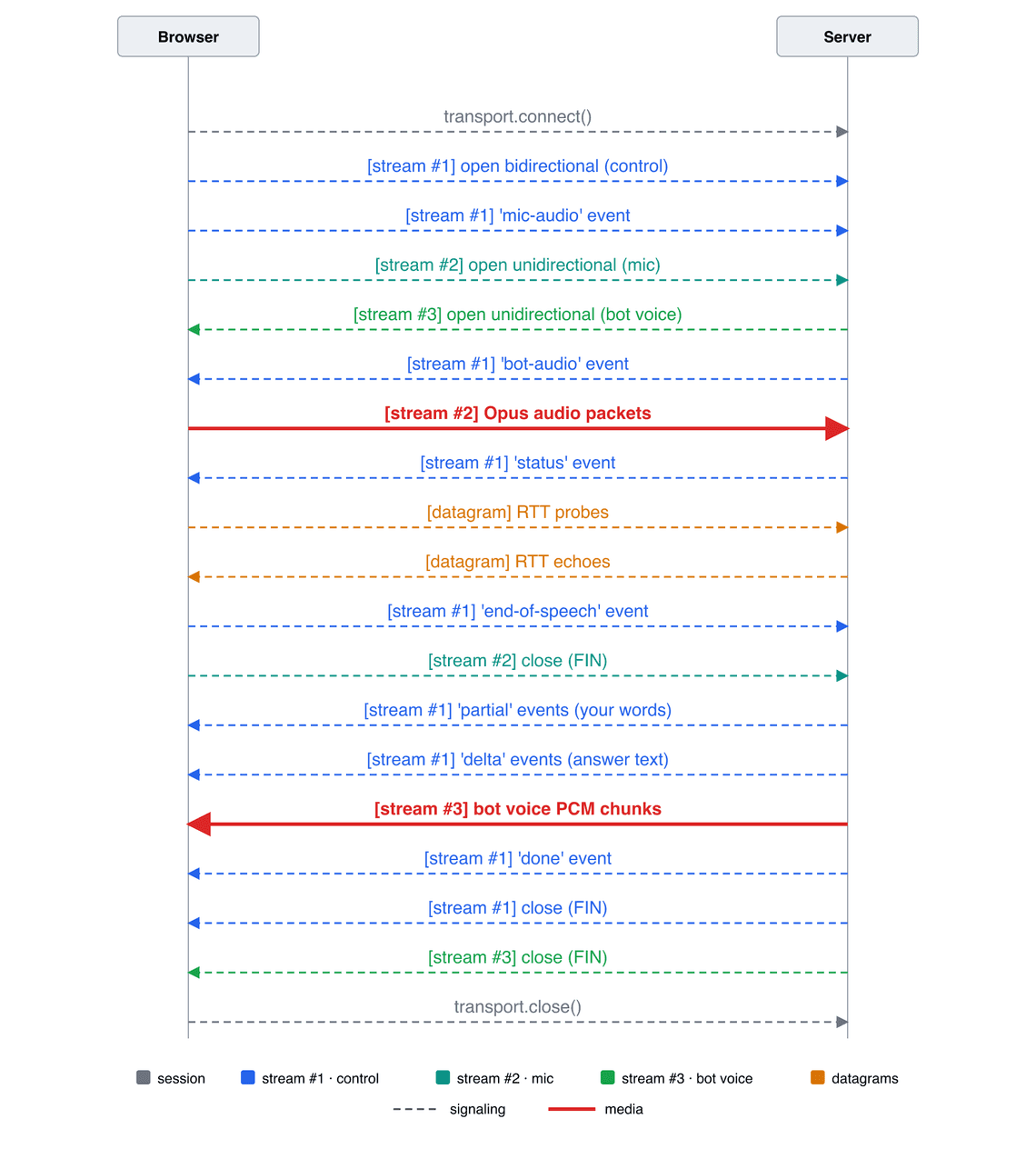
Two things to notice on this flow.
activityStart / activityEnd markers, and the bot starts answering quiet immediately. No silence-detection delay.Let me highlight the parts that taught me the most.
MediaRecorder would be simpler: record, stop, upload a blob. But it buffers, adds container overhead, and delivers chunks on its own schedule. With WebCodecs, I get each encoded Opus frame the moment it exists (every 20 ms) and I push it on the wire immediately, so the server can start working while I am still talking.
Three steps replace what WebRTC was doing for me: capturing, encoding, sending.
Step 1 — Capturing (WebRTC + WebAudio + Streams). getUserMedia gives me the microphone track, and with it the browser’s echo cancellation, noise suppression and gain control for free. The track then goes through a tiny Web Audio graph whose only job is to pin the format (48 kHz, mono), and MediaStreamTrackProcessor turns the resulting track into raw AudioData frames I can read one by one:
// getUserMedia -> audio track -> Web Audio (48 kHz, mono) -> raw AudioData framesconst stream = await navigator.mediaDevices.getUserMedia({ audio: true })const ctx = new AudioContext({ sampleRate: 48000 })const destination = new MediaStreamAudioDestinationNode(ctx, {channelCount: 1, channelCountMode: 'explicit'})// silent keepalive: Chrome stops producing frames when the destination// has no active source connectedconst keepalive = ctx.createConstantSource()keepalive.offset.value = 0keepalive.connect(destination)keepalive.start()ctx.createMediaStreamSource(stream).connect(destination)const track = destination.stream.getAudioTracks()[0]const frameReader = new MediaStreamTrackProcessor({ track }).readable.getReader()while (capturing) {const { value: audioData, done } = await frameReader.read()if (done) breakaudioEncoder.encode(audioData) // the encoder of step 2audioData.close() // frames come from a small pool: always close them}
The silent ConstantSourceNode deserves a word, because it took me a while to find. Whenever the destination node has no active source connected (before the real source is attached, or after it ends), Chrome silently stops producing frames: track.muted stays false, nothing throws, frameReader.read() just never resolves. A muted constant source connected once at setup keeps the graph rendering at all times.
Step 2 — Encoding (WebCodecs). The WebCodecs AudioEncoder compresses each raw frame into a 20 ms Opus packet. And since a WebTransport stream is a pipe of bytes with no boundaries, each packet is wrapped into a record: a 4-byte length prefix written with a DataView, then the payload:
const audioEncoder = new AudioEncoder({output: (chunk) => {const record = new Uint8Array(4 + chunk.byteLength)new DataView(record.buffer).setUint32(0, chunk.byteLength) // length prefixchunk.copyTo(record.subarray(4))micWriter.write(record) // straight to the wire, see step 3},error: (err) => console.error(err)})audioEncoder.configure({codec: 'opus', sampleRate: 48000, numberOfChannels: 1, bitrate: 32_000})
Step 3 — Sending (WebTransport). The mic has its own unidirectional stream inside the session. Open it, get its writer, announce what it carries, and from then on every record produced by the encoder is written as soon as it exists:
const micStream = await transport.createUnidirectionalStream()const micWriter = micStream.getWriter()const header = new TextEncoder().encode(JSON.stringify({ kind: 'mic-audio', codec: 'opus' }) + '\n')await micWriter.write(header)// then, for the whole utterance: micWriter.write(record) from step 2
That is the entire media pipeline: around forty lines from the microphone to the network.
This is the part WebRTC developers forget: there is no SDP, no RTP, no packetization rules. A QUIC stream is a byte pipe. If I write three Opus frames, the server reads one blob of bytes with no boundaries. So I defined a minimal wire format: each stream starts with one JSON header line describing what it carries, then length-prefixed records:
{"kind":"mic-audio","codec":"opus"}\n[u32 length][opus packet][u32 length][opus packet]...
The control stream uses newline-delimited JSON events in both directions (end-of-speech going up, status / partial / delta / done coming down).
It is twenty lines of code, and it is also the moment you realize what “WebRTC does this for you” actually means. RTP timestamps, sequence numbers, payload types: all of that exists because raw transports have no opinion about your data. Remember this point, it is exactly where MoQ will enter the game later.
My favorite detail of the sample. When you release the button, the client does two things:
controlWriter.write(encoder.encode(JSON.stringify({ type: 'end-of-speech' }) + '\n'))await micWriter.close() // QUIC FIN: "I have nothing more to say"
Closing the mic stream sends a QUIC FIN, which is delivered reliably and ordered after the last audio byte. It is a protocol-level end-of-speech signal that costs nothing. The server reacts to whichever of the two signals arrives first.
The Node.js side accepts sessions on https://...:4433/voice and does two interesting things: turning the mic stream into something Gemini accepts, and turning Gemini’s answer into a stream the browser can play.
Uplink: reassemble, decode, downsample. Remember that a stream delivers bytes, not packets: the first job is to reassemble the [u32 length][opus packet] records, exactly the mirror of what the client wrote. Each Opus packet is then decoded with opusscript (a pure-JS libopus) and downsampled: Gemini Live works natively at 16 kHz (it accepts other rates, but resamples them server-side anyway), so downsampling locally sends three times less data to Google for zero quality loss:
const opusDecoder = new OpusScript(48000, 1, OpusScript.Application.AUDIO)// bytes in -> records out: the loop runs on every chunk read from the streambuffer = concat(buffer, chunk)while (buffer.length >= 4) {const length = new DataView(buffer.buffer, buffer.byteOffset).getUint32(0)if (buffer.length < 4 + length) break // record not complete yet, wait for more bytesconst packet = Buffer.from(buffer.slice(4, 4 + length))buffer = buffer.slice(4 + length)const pcm48 = Buffer.from(opusDecoder.decode(packet)) // Opus -> PCM 48 kHzconst pcm16 = downsample48to16(pcm48) // 48 kHz -> 16 kHzlive.sendRealtimeInput({audio: { data: pcm16.toString('base64'), mimeType: 'audio/pcm;rate=16000' }})}
The downsampler does not deserve a DSP library: going from 48 kHz to 16 kHz is an exact 3:1 ratio, so averaging each group of three samples does the job and doubles as a cheap low-pass filter:
function downsample48to16(pcm48) {const samples = Math.floor(pcm48.length / 2 / 3)const out = Buffer.alloc(samples * 2)for (let i = 0; i < samples; i++) {const sum = pcm48.readInt16LE(i * 6) + pcm48.readInt16LE(i * 6 + 2) + pcm48.readInt16LE(i * 6 + 4)out.writeInt16LE(Math.round(sum / 3), i * 2)}return out}
Downlink: forward Gemini’s voice on a new stream. A browser cannot accept an incoming WebTransport session, but inside an established session it happily accepts server-initiated streams. So the server opens a unidirectional stream towards the browser, announces it with a bot-audio event on the control stream, and then forwards each PCM chunk coming from Gemini as a length-prefixed record — same wire format as the uplink, no re-encoding, the browser plays the 24 kHz PCM directly with Web Audio:
// stream #3 in the flow above: server -> browserconst audioStream = await session.createUnidirectionalStream()const audioWriter = audioStream.getWriter()send({ type: 'bot-audio', sampleRate: 24000, channels: 1 }) // on the control stream// in the Gemini Live onmessage callback:for (const part of message.serverContent?.modelTurn?.parts ?? []) {const inline = part.inlineDataif (inline?.data && inline.mimeType?.startsWith('audio/pcm')) {const pcm = Buffer.from(inline.data, 'base64')const record = Buffer.alloc(4 + pcm.length)record.writeUInt32BE(pcm.length, 0)pcm.copy(record, 4)audioWriter.write(record)}}
Note: the rate asymmetry (16 kHz in, 24 kHz out) is not an accident. The input is consumed by a model: speech intelligibility lives below 8 kHz, so 16 kHz captures everything the machine needs and anything more is wasted bytes. The output is consumed by your ears: it comes from a neural TTS, and 24 kHz is the sweet spot where a synthesized voice sounds natural. Media for machines and media for humans do not have the same requirements — which is exactly the Voice-AI question raised in the webrtcHacks article quoted at the beginning.
And that is all: no ICE agent, no DTLS state machine, no RTP depacketizer. Any HTTP/3 library and around two hundred lines of regular backend code.
The least documented part of the whole exercise: for local development, the browser refuses a classic self-signed certificate; the supported path is serverCertificateHashes.
// {fingerprint: '3f9a...', port: 4433} — published by the server at startupconst { fingerprint, port } = await (await fetch('/fingerprint')).json()const hashBytes = new Uint8Array(fingerprint.match(/../g).map((b) => parseInt(b, 16)))const transport = new WebTransport(`https://${host}:${port}/voice`, {serverCertificateHashes: [{ algorithm: 'sha-256', value: hashBytes }]})await transport.ready
In short:
/fingerprint): fetching it is the first thing the client does.Before you get too enthusiastic, here is an honest status, mid-2026.
Browser support. This stopped being the blocker: Chrome has shipped WebTransport since version 97 (2022), Firefox since 114 (2023), and with Safari finally joining, MDN flags WebTransport as Baseline newly available since March 2026. It is HTTPS-only and secure-context-only everywhere.
“Baseline” does not mean “identical”, though. Here is what the walkie-talkie gave me on the three engines:
| Browser | Status | Notes |
|---|---|---|
| Chrome M149 | ✅ | The demo works end to end, as described in this article — but the WebTransport API itself is not complete (getStats() is missing) |
| Firefox 153 | 🎩 | Sleight of hand Insertable Streams ( MediaStreamTrackProcessor) are not implemented: the capture has to go through an AudioWorkletNode instead |
| Safari 26.5 | 🎩🎩 | Double sleight of hand Same as Firefox, plus the client cannot create streams toward the server: the whole scenario has to be revisited to make it work (server-created streams, mic audio over datagrams) |
So even with WebTransport flagged as Baseline, making a real application work is not that simple: WebTransport never travels alone, it needs other APIs around it (WebCodecs, Insertable Streams, Web Audio…), and those do not move at the same pace in every browser. And turning this demo into a production AI bot would take quite a bit more work than what is shown in this article.
getStats(). Forget everything you know from WebRTC’s getStats() and its dozens of metric types: this one has nothing in common. WebTransport.getStats() returns a single object of transport-level counters: RTT (smoothedRtt, rttVariation, minRtt), bytes and packets sent and received, packets lost, an estimated send rate, and a flag telling whether more bandwidth is available or not. No qualityLimitationReason, no jitter buffer telemetry, no per-frame counters: the browser has no idea you are doing media. Support is its own surprise: Safari 26.5 has it, Firefox 151 has it, Chrome 149 does not (it seems to be coming around Chrome 151) — which is why my demo also measures RTT with its own datagram echo probes. If you build media on WebTransport, you are also building your own metrics pipeline.
Server-side runtimes. The browser is only half of the story: your server needs to speak HTTP/3 too. Node.js has no native WebTransport, and its QUIC support is still experimental. You need a third-party package: my demo uses @fails-components/webtransport, which embeds Google’s quiche as a native addon and exposes sessions and streams as standard WHATWG streams. Deno ships WebTransport natively. It seems to be behind a flag. Not tested.
Behind a firewall or a corporate network. This is the big one: WebTransport needs UDP, and today there is no fallback. On a network that blocks it, the connection simply fails, while a WebRTC application in the next tab survives by relaying over TCP on port 443. The good news is that work is in progress: the IETF is finalizing WebTransport over HTTP/2, which would let the same API switch to a TCP-based connection when UDP is blocked — the API was designed with that day in mind. Until browsers ship it, though: acceptable for an internal tool, a real availability decision for a product.
In fact, this is not the question: this example is just here to illustrate how WebTransport works. I only did something workable on my machine… like any developer could say :-) What could happen with a real server on the Internet is another story, and it was not the goal here.
One honest feeling, though: building voice over WebTransport felt like playing the piano with boxing gloves. You juggle with arrays of bytes, you chain low-level APIs everywhere… we are far from a simple addTrack(). And we are equally far from the introspection WebRTC offers: likely limited to bytes and packets, everything else is left for someone to build.
WebTransport is here to fill gaps, probably not to kill another API. But above all, it is the door that opens QUIC to web developers. And QUIC is full of possibilities, as Kyber shows: it already remotely controls robots and drones with around 10 ms of latency, over QUIC/HTTP3. The foundations have proven their power.
So if you have never tried WebTransport, it is time to give it a try and see whether one of your features needs it, or not.